Is your Intune Win32 app stuck in a constant install or reinstall loop? This article explains why auto-updating software breaks rigid detection rules and shows the correct, production-ready way to fix it permanently.
Keywords
Intune Win32 App, Detection Rules, Installation Loop, Registry Detection, Version Comparison, Intune Troubleshooting, Auto-Updating Software
The Real-World Problem: The Endless “Installing” Loop
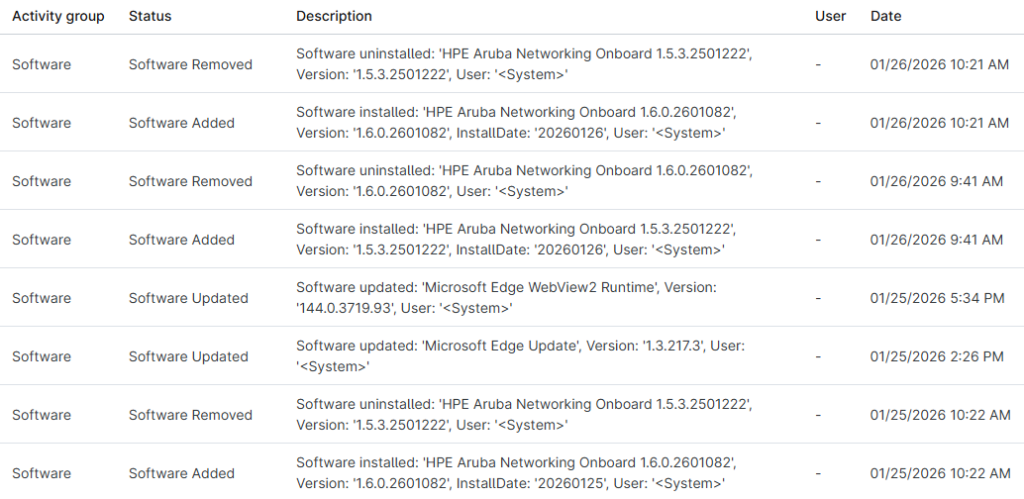
You package a Win32 app. You deploy it with Intune. Installation succeeds. The device reports Installed. Life is good.
Then a few days later:
- Users open tickets saying the app keeps reinstalling
- Intune reports Installation failed
- Or worse: “The application was not detected after installation completed successfully”
Meanwhile, the app is clearly installed and running on the device.
This isn’t an Intune bug. It’s a logic problem.
Why Intune Thinks Your App Is Missing
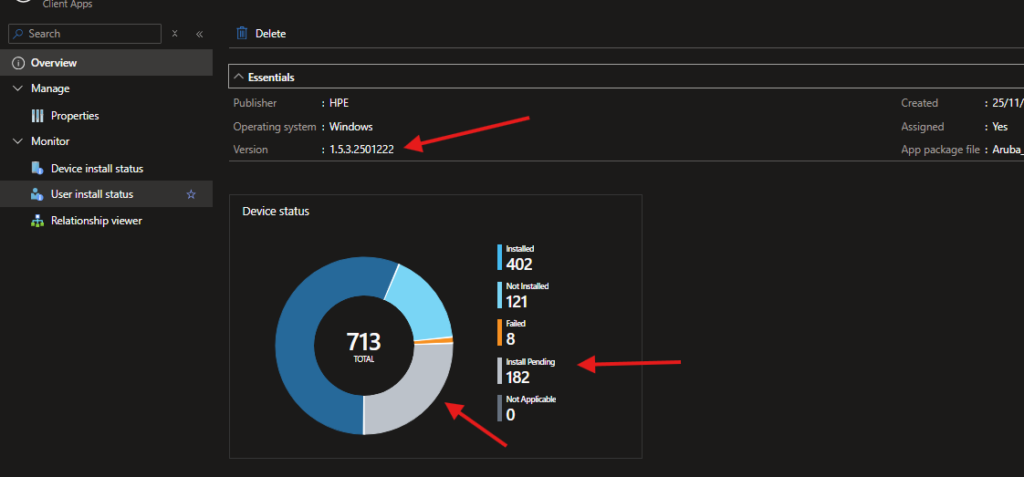
Intune doesn’t trust installations. It trusts detection rules.
Every evaluation cycle, Intune asks one question only:
“Does the detection rule return TRUE?”
If the answer is No, Intune assumes the app is missing or broken and tries to reinstall it.
The most common reason this fails in production is auto-updating software combined with an exact version check.
The Classic Trap: Auto-Updates vs. “Equals”
Many modern apps update themselves:
- Google Chrome
- Zoom
- Teams Machine-Wide Installer
- Aruba Onboard
- VPN clients
- Security agents
They do not wait for Intune.
What Breaks the Deployment
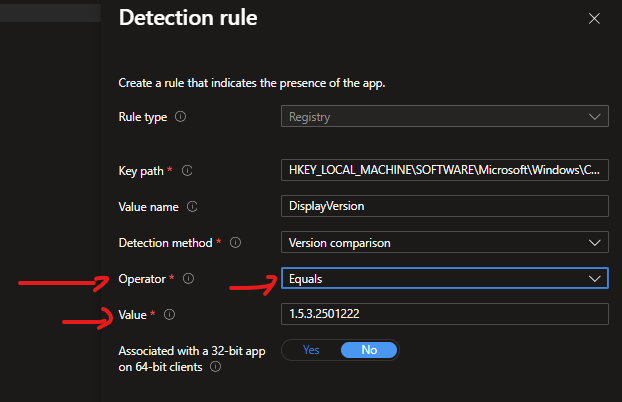
Here’s the failure chain that causes the loop:
- You package version 1.5.3.2501222
- Detection rule checks registry value
DisplayVersionEquals1.5.3.2501222 - App installs successfully → Detection passes
- App auto-updates itself to 1.5.3.2501223
- Intune runs detection again
Registry says: 1.5.3.2501223
Detection rule expects: 1.5.3.2501222
Result: ❌ Detection fails
Intune reaction: Reinstall immediately
This creates:
- Endless install loops
- False failures
- Network noise
- Angry users
The Correct Fix: Version-Aware Detection Rules
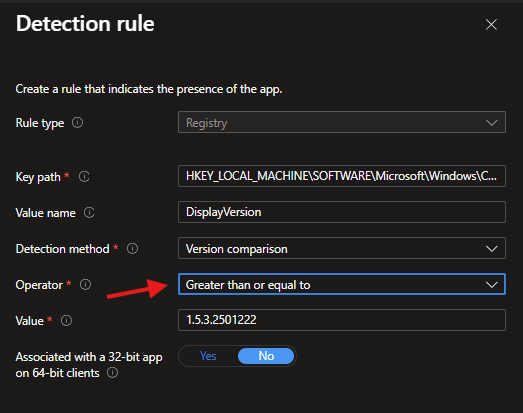
The fix is simple, but the logic matters.
You don’t want to detect one exact version.
You want to detect minimum acceptable version.
Recommended Detection Rule Configuration
Rule type: Registry
Key path:
HKEY_LOCAL_MACHINE\SOFTWARE\Microsoft\Windows\CurrentVersion\Uninstall\{APP-GUID}
Value name: DisplayVersion
Detection method: Version comparison
Operator: Greater than or equal to
Value: 1.5.3.2501222
Why This Works (And Scales)
Now Intune asks:
“Is the installed version greater than or equal to the deployed version?”
If the app auto-updates:
1.5.3.2501223≥1.5.3.2501222→ ✅ TRUE
Intune reports Installed, stops reinstalling, and leaves the device alone.
This logic:
- Survives auto-updates
- Prevents detection flapping
- Works across versions
- Is safe for production
What You Should Avoid ❌
These are common but bad fixes:
- Hard-coding exact versions
- Using file existence only
- Re-packaging on every vendor update
- Disabling detection logic
They work briefly, then break at scale.
Production Best Practice Summary
- Detection rules must reflect real app behavior
- Auto-updating apps require version comparison, not equality
- Detection logic is more important than install logic
- If detection is wrong, Intune will never be stable
Why This Matters in Real Environments
At scale, detection loops mean:
- Unnecessary bandwidth usage
- Increased device load
- Failed compliance reporting
- Reduced trust in Intune
This is the kind of issue that separates working Intune from well-engineered Intune.
Level Up Your Intune Skills
Fixing Win32 detection loops is one example of how small configuration choices create massive operational impact.
If you want to move beyond reactive troubleshooting and actually master Intune:
app.msendpoint.com
The platform is built to:
- Teach real-world Intune engineering
- Cover packaging, detection, remediation, and governance
- Close the gap between theory and production
This is not lab Intune. This is enterprise Intune.
Next deep-dives: Win32 supersedence pitfalls, detection scripting strategies, and automated validation at scale.