Hi, I'm Souhaiel. Today I'll show you 5 methods to force sync devices in Intune. There are times when waiting for the default sync cycle is impractical—especially when testing or pushing critical settings. Whether you've deployed a critical security policy, need to troubleshoot a device issue, or ensure compliance immediately, forcing a sync lets you take control and save time, ensuring devices update precisely when you need them to.
Microsoft.Graph.Intune module is deprecated. This guide uses the current Microsoft.Graph.DeviceManagement module, which is actively maintained and required for modern Intune automation.
The Big Picture: How Device Sync Works in Intune
Before diving into the 5 methods, let's understand the complete flow. When you force a sync, your command travels through Microsoft Graph API to Intune's cloud service, which queues the sync request and delivers it to your managed device. The device then reports back its compliance status and installed policies.
Method 1: Force Sync Using PowerShell with Microsoft Graph
Prerequisites
You'll need the Microsoft.Graph.DeviceManagement PowerShell module. The legacy Microsoft.Graph.Intune module is deprecated and no longer receives updates.
Step 1: Install and Connect to Microsoft Graph
Install the module and authenticate with required scopes:
Install-Module Microsoft.Graph.DeviceManagement -Force
Connect-MgGraph -Scopes "DeviceManagementManagedDevices.ReadWrite.All"
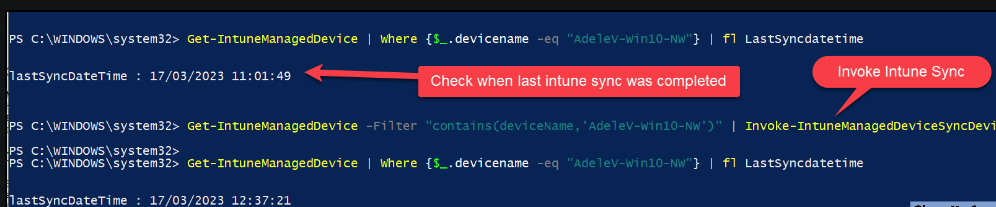
Step 2: Check Last Sync Status
Verify when a device last synced before triggering a forced sync:
Get-MgDeviceManagementManagedDevice -Filter "deviceName eq 'LAPTOP-Win10-NW'" -Property lastSyncDateTime | Select-Object deviceName, lastSyncDateTime
What this returns: A table showing the device name and the exact UTC timestamp of its last sync. This confirms whether your device is actively reporting to Intune.
Step 3: Invoke Sync on a Single Device
Trigger a sync for a specific device by retrieving its managed device ID:
$device = Get-MgDeviceManagementManagedDevice -Filter "deviceName eq 'LAPTOP-Win10-NW'"
Invoke-MgDeviceManagementManagedDeviceSyncDevice -ManagedDeviceId $device.Id
Expected Output: The command returns HTTP 200 OK on successful sync request (no console output by default). The device will sync within 5–10 seconds if it's online.
lastSyncDateTime updated to a recent timestamp, the forced sync worked.
Method 2: Sync All Devices or Filter by OS
In larger environments, you often need to sync all devices of a specific OS type at once. PowerShell makes this easy with a loop.
Sync All Windows Devices
To sync all Windows 10/11 devices managed by Intune:
$devices = Get-MgDeviceManagementManagedDevice -Filter "operatingSystem eq 'Windows'"
foreach ($device in $devices) {
    Invoke-MgDeviceManagementManagedDeviceSyncDevice -ManagedDeviceId $device.Id
    Write-Host "Sync request sent to $($device.deviceName)"
}
What happens: PowerShell retrieves all Windows devices, then loops through each one, sending a sync request. You'll see output like:
Sync request sent to LAPTOP-Win10-NW
Sync request sent to DESKTOP-ABC123
Sync request sent to SURFACE-PRO-7
"operatingSystem eq 'iOS'", "operatingSystem eq 'Android'", "operatingSystem eq 'macOS'", or "deviceName startswith 'CORP'".
Method 3: Sync Large Device Collections (1000+ Devices)
For environments with more than 1000 devices, the default query returns only 100 results. Use the -All parameter to retrieve all results with automatic pagination:
$devices = Get-MgDeviceManagementManagedDevice -Filter "operatingSystem eq 'Windows'" -All
foreach ($device in $devices) {
    Invoke-MgDeviceManagementManagedDeviceSyncDevice -ManagedDeviceId $device.Id
    Write-Host "Sync request sent to $($device.deviceName) - ID: $($device.Id)"
}
Key difference: The -All parameter automatically handles pagination, so you get every single device, not just the first 100.
Add Throttling to Avoid API Rate Limits
Microsoft Graph enforces rate limits (HTTP 429 responses) when you make too many requests too quickly. For bulk operations on 1000+ devices, add a delay between each request:
$devices = Get-MgDeviceManagementManagedDevice -Filter "operatingSystem eq 'Windows'" -All
foreach ($device in $devices) {
    Invoke-MgDeviceManagementManagedDeviceSyncDevice -ManagedDeviceId $device.Id
    Write-Host "Sync request sent to $($device.deviceName)"
    Start-Sleep -Milliseconds 500
}
The 500ms delay: This ensures you stay under Microsoft Graph's rate limit (typically 2000 requests per 10 seconds per app). For 10,000 devices, this translates to roughly 85 minutes total runtime.
Method 4: Sync by Device Group (Advanced)
You need to sync only devices in a specific Microsoft Entra ID group. This method cross-references group membership with managed devices:
$groupId = "12345678-1234-1234-1234-123456789012"
$devices = Get-MgDeviceManagementManagedDevice -All
$groupMembers = Get-MgGroupMember -GroupId $groupId -All

foreach ($device in $devices) {
    if ($groupMembers.id -contains $device.UserId) {
        Invoke-MgDeviceManagementManagedDeviceSyncDevice -ManagedDeviceId $device.Id
        Write-Host "Sync sent to $($device.deviceName)"
    }
}
Start-Sleep -Milliseconds 500) and running this during off-hours.
Finding Your Group ID
To find the correct group ID, run:
Get-MgGroup -Filter "displayName eq 'Marketing Devices'" | Select-Object id, displayName
Replace "Marketing Devices" with your actual group name. Copy the id value into the script above.
Method 5: Use Intune Admin Center Bulk Device Actions
If you prefer a UI-driven approach, Intune Admin Center offers bulk device actions without requiring PowerShell.
Steps to Invoke Sync Using Bulk Device Actions
- Open Intune Admin Center — Navigate to
https://intune.microsoft.comand sign in with admin credentials. - Go to Devices → All devices — You'll see a list of all enrolled devices.
- Select multiple devices — Check the checkboxes next to the devices you want to sync.
- Click "Sync" — A "Sync" button appears in the top menu. Click it.
- Confirm the bulk action — A confirmation dialog appears. Click "Yes" to confirm.
- Monitor progress — A notification confirms the sync request has been queued for all selected devices.
Limitations of Bulk Actions
The Intune Admin Center bulk action feature has a few important constraints:
- Maximum of 100 devices per bulk action — If you need to sync 500 devices, you'll have to repeat the process 5 times.
- Cannot apply filters programmatically — You must manually select each device or group.
- Manual selection required for large environments — For 1000+ device organizations, PowerShell is far more efficient.
Default Intune Policy Refresh Cycles
Understanding automatic refresh cycles helps you determine when forced sync is necessary. By default, devices check in at different intervals depending on their OS type.
| Device Type | Initial Refresh | Ongoing Cycle |
|---|---|---|
| iOS/iPadOS | Every 15 minutes for 1 hour | Every 8 hours |
| macOS | Every 15 minutes for 1 hour | Every 8 hours |
| Android (Company Portal) | Every 3 minutes for 15 minutes, then every 15 minutes for 2 hours | Every 8 hours |
| Windows 10/11 | Every 3 minutes for 15 minutes, then every 15 minutes for 2 hours | Every 8 hours |
| Windows 8.1 | Every 5 minutes for 15 minutes, then every 15 minutes for 2 hours | Every 8 hours |
Sync Timing Expectations
When you force a sync, response times vary by device type:
- Windows devices: Typically 5–10 seconds
- Mobile devices (iOS/Android): 1–2 minutes
- macOS devices: 1–2 minutes
- Compliance evaluation: Occurs immediately after sync completes
Windows devices respond much faster because the Intune Management Extension runs as a system service with continuous network monitoring. Mobile devices and macOS rely on periodic background sync checks, so they respond within their next sync window.
Troubleshooting Forced Sync Issues
Verify Sync Request Was Received
To confirm a forced sync actually executed, check the device's last sync timestamp 30 seconds after triggering the sync:
# Check if sync request was processed (run 30 seconds after forcing sync)
$device = Get-MgDeviceManagementManagedDevice -Filter "deviceName eq 'LAPTOP-Win10-NW'"
$device | Select-Object deviceName, lastSyncDateTime

# If lastSyncDateTime updated to a recent timestamp, sync was successful
Success indicator: If lastSyncDateTime is within the last 30 seconds, the sync succeeded. If it's older, the sync request either failed or the device didn't receive it.
Common Issues and Resolution
| Issue | Cause | Resolution |
|---|---|---|
| Device Offline | Device not connected to internet | Sync request is queued and executes when device reconnects to Intune service |
| Missing Permissions | Admin account lacks required scopes | Ensure DeviceManagementManagedDevices.ReadWrite.All scope is granted during Connect-MgGraph |
| HTTP 429 (Rate Limiting) | Too many API requests too quickly | Use Start-Sleep -Milliseconds 500 for bulk operations exceeding 100 devices |
| Deprecated Module Error | Using old Microsoft.Graph.Intune module |
Migrate to Microsoft.Graph.DeviceManagement module |
| No Results from Query | Filter syntax incorrect or device doesn't exist | Verify filter syntax (e.g., deviceName eq 'LAPTOP-Win10') and confirm device exists in Intune |
Community Workarounds
PowerShell Module Installation Issues
If you encounter conflicts with existing Graph modules, use the -AllowClobber parameter during installation to override conflicting cmdlet names:
Install-Module Microsoft.Graph.DeviceManagement -AllowClobber -Force
What this does: Allows the new module to replace duplicate cmdlet names from older modules. This is safe and ensures you're using the latest version.
Handling Devices with Special Characters in Names
When device names contain quotes or special characters, escaping becomes complicated. The most reliable approach is to use the device ID directly:
# Problematic device name with special chars:
# "LAPTOP-O'Malley's #1"

# Alternative approach using device ID directly (most reliable)
$deviceId = "a1b2c3d4-e5f6-g7h8-i9j0-k1l2m3n4o5p6"
Invoke-MgDeviceManagementManagedDeviceSyncDevice -ManagedDeviceId $deviceId
To find a device ID by name, even with special characters:
Get-MgDeviceManagementManagedDevice -All | Where-Object { $_.deviceName -like "*Malley*" } | Select-Object id, deviceName
Bulk Sync Timeout for Large Fleets (10,000+ Devices)
For very large organizations, segmenting syncs by organizational unit or location improves reliability and prevents timeouts:
$devices = Get-MgDeviceManagementManagedDevice -Filter "operatingSystem eq 'Windows' and deviceName startswith 'NYC'" -All
$batchSize = 500
for ($i = 0; $i -lt $devices.Count; $i += $batchSize) {
    $batch = $devices[$i..($i + $batchSize - 1)]
    foreach ($device in $batch) {
        Invoke-MgDeviceManagementManagedDeviceSyncDevice -ManagedDeviceId $device.Id
        Start-Sleep -Milliseconds 100
    }
    Write-Host "Batch processed. Waiting 10 seconds before next batch..."
    Start-Sleep -Seconds 10
}
How this works: Instead of syncing all 10,000 devices in a single loop, this script processes them in batches of 500, with a 10-second pause between batches. This prevents API timeouts and spreads the load evenly.
$batchSize based on your environment:
- Smaller organizations (1,000–5,000 devices): 500–1000 devices per batch
- Large organizations (5,000–20,000): 300–500 devices per batch
- Enterprise (20,000+): 100–250 devices per batch
Sync Verification via Audit Logs
For compliance-sensitive environments, you can verify forced syncs in Microsoft Entra audit logs by searching for "Managed Device Sync" actions:
# Search audit logs for forced sync actions (within 60 seconds of execution)
Get-MgAuditLogDirectoryAudit -Filter "activityDisplayName eq 'Managed Device Sync'" | Select-Object createdDateTime, userPrincipalName, activityDisplayName, result
What you'll see: A log entry for each forced sync, including the timestamp, admin account that triggered it, and whether it succeeded. This creates an audit trail for compliance audits.
Quick Reference: When to Use Each Method
| Scenario | Method | Complexity | Best For |
|---|---|---|---|
| One device, quick sync | Method 1 (PowerShell single) | Low | Troubleshooting a specific user's laptop |
| All Windows devices | Method 2 (OS filter) | Low | Rolling out a security patch to Windows fleet |
| 1000+ devices, bulk sync | Method 3 (Pagination + throttling) | Medium | Company-wide policy update, production automation |
| Specific Entra ID group | Method 4 (Group membership) | Medium | Department-specific compliance refresh |
| Ad-hoc 5–50 devices, no PowerShell | Method 5 (Admin Center UI) | Low | Quick troubleshooting by non-technical admin |
Key Takeaways
- Method 1: Single device sync via PowerShell—simple and reliable for one device.
- Method 2: Filter by OS type (Windows, iOS, Android) and bulk sync all matching devices in one command.
- Method 3: For 1000+ devices, use pagination (
-All) and throttling (500ms delay) to avoid API rate limits. - Method 4: Cross-reference Entra ID group membership to sync only devices in a specific group.
- Method 5: UI bulk actions in Intune Admin Center—no scripting, but limited to 100 devices per action.
- Always throttle bulk operations: 500ms delay between syncs prevents HTTP 429 rate-limit failures.
- Verify success: Check
lastSyncDateTimewithin 30 seconds of forcing sync to confirm it worked. - Compliance audits: Use Azure Audit Logs to track who forced syncs and when—important for SOC 2 and ISO 27001 compliance.
function Invoke-BulkSync {
    param(
        [string]$Filter = "operatingSystem eq 'Windows'",
        [int]$ThrottleMs = 500
    )
    $devices = Get-MgDeviceManagementManagedDevice -Filter $Filter -All
    foreach ($device in $devices) {
        Invoke-MgDeviceManagementManagedDeviceSyncDevice -ManagedDeviceId $device.Id
        Start-Sleep -Milliseconds $ThrottleMs
    }
}
Then call it with custom filters: Invoke-BulkSync -Filter "deviceName startswith 'CORP'"
