Introduction
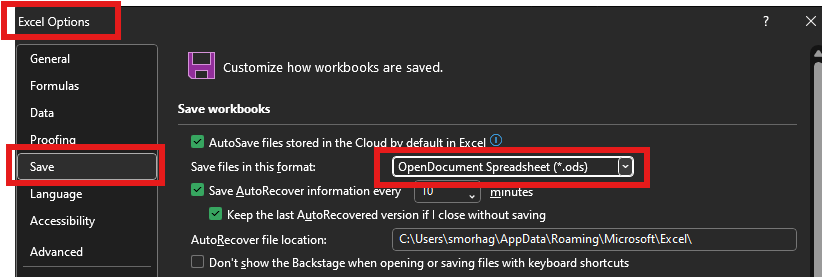
As an Intune administrator, I recently encountered a configuration issue where Office applications—Excel, Word, and PowerPoint—were defaulting to open document formats (such as ODS and ODT) rather than the native Office formats (like XLSX, DOCX, and PPTX). This misconfiguration, introduced during the installation process, has the potential to create compatibility challenges and user confusion.
The Problem
When deploying Office via Intune, the expected behavior is for each application to use its native file format:
- Word: Should use
.docx - Excel: Should use
.xlsx - PowerPoint: Should use
.pptx
However, due to an unintended configuration during installation, the default settings were altered to open document formats. This issue not only disrupts the typical workflow but also raises concerns about file compatibility and the overall user experience.
Why It Matters
- Compatibility Issues: Files saved in open document formats may not fully leverage Office’s features and can cause formatting discrepancies when shared.
- User Experience: Users accustomed to Office’s native formats might experience unexpected behavior when opening or saving files.
- Operational Efficiency: Manually correcting these settings on multiple devices is both time-consuming and prone to error.
A Scripted Solution
To address this issue, you can use a detection and remediation script that checks the current default file format settings and corrects them as needed. Below is the:
Detection Script: please copy Paste and save it as .ps1
# This Detection script gone detect the default format on word excel powerpoint
# Author Souhaiel MORHAG
# 3/3/2025
# msendpoint.com

$incorrectSettings = @()

# Excel default format check
$excelKey = "HKCU:SoftwareMicrosoftOffice16.0ExcelOptions"
$excelValue = Get-ItemProperty -Path $excelKey -Name "DefaultFormat" -ErrorAction SilentlyContinue
if ($excelValue.DefaultFormat -ne 51) { $incorrectSettings += "Excel" }  # 51 = XLSX

# Word default format check
$wordKey = "HKCU:SoftwareMicrosoftOffice16.0WordOptions"
$wordValue = Get-ItemProperty -Path $wordKey -Name "DefaultFormat" -ErrorAction SilentlyContinue
if ($wordValue.DefaultFormat -ne "DOCX") { $incorrectSettings += "Word" }  # DOCX = correct format

# PowerPoint default format check
$pptKey = "HKCU:SoftwareMicrosoftOffice16.0PowerPointOptions"
$pptValue = Get-ItemProperty -Path $pptKey -Name "DefaultFormat" -ErrorAction SilentlyContinue
if ($pptValue.DefaultFormat -ne 1) { $incorrectSettings += "PowerPoint" }  # 1 = PPTX

# If any setting is incorrect, return a non-zero exit code
if ($incorrectSettings.Count -gt 0) {
    Write-Host "Incorrect format for: $($incorrectSettings -join ', ')"
    Exit 1
} else {
    Write-Host "All applications have the correct default format."
    Exit 0
}
Remediation Script: please copy Paste and save it as .ps1
# This Remediation script gone adjust the default format on word excel powerpoint to office format
# Author Souhaiel MORHAG
# 3/3/2025
# Set Excel default format to XLSX
$excelKey = "HKCU:SoftwareMicrosoftOffice16.0ExcelOptions"
Set-ItemProperty -Path $excelKey -Name "DefaultFormat" -Value 51

# Set Word default format to DOCX
$wordKey = "HKCU:SoftwareMicrosoftOffice16.0WordOptions"
Set-ItemProperty -Path $wordKey -Name "DefaultFormat" -Value "DOCX"

# Set PowerPoint default format to PPTX
$pptKey = "HKCU:SoftwareMicrosoftOffice16.0PowerPointOptions"
Set-ItemProperty -Path $pptKey -Name "DefaultFormat" -Value 1

Write-Host "Default formats corrected for Excel, Word, and PowerPoint."
Deploying via Intune
Using Intune’s scripting capabilities, this script can be deployed across your device fleet. By automating the detection and remediation process, you ensure that all users have the correct default settings without the need for manual intervention.
Conclusion
Ensuring that Office applications default to their native file formats is crucial for maintaining compatibility and a seamless user experience. With a well-crafted detection and remediation script, administrators can proactively resolve configuration issues, reduce support overhead, and improve overall operational efficiency.
Have you encountered similar challenges in your environment? Share your experiences and insights in the comments below!
